
Troubleshooting a Pod
If a pod shows “Pod is loading…” for more than a few minutes, there is usually an issue with starting it. The most common causes:
- Storage is full: Check the disk usage shown on the pod and add storage in the pod’s settings.
- Not enough memory: Larger apps can fail to start with too little memory. Increase it in the pod’s settings.
- A wrong setting: A typo in an environment variable (Env Vars) can keep an app from starting. Undo your last change.
- An error inside the app: The logs will usually show what went wrong.
Follow the steps below to find the cause:
Check Logs
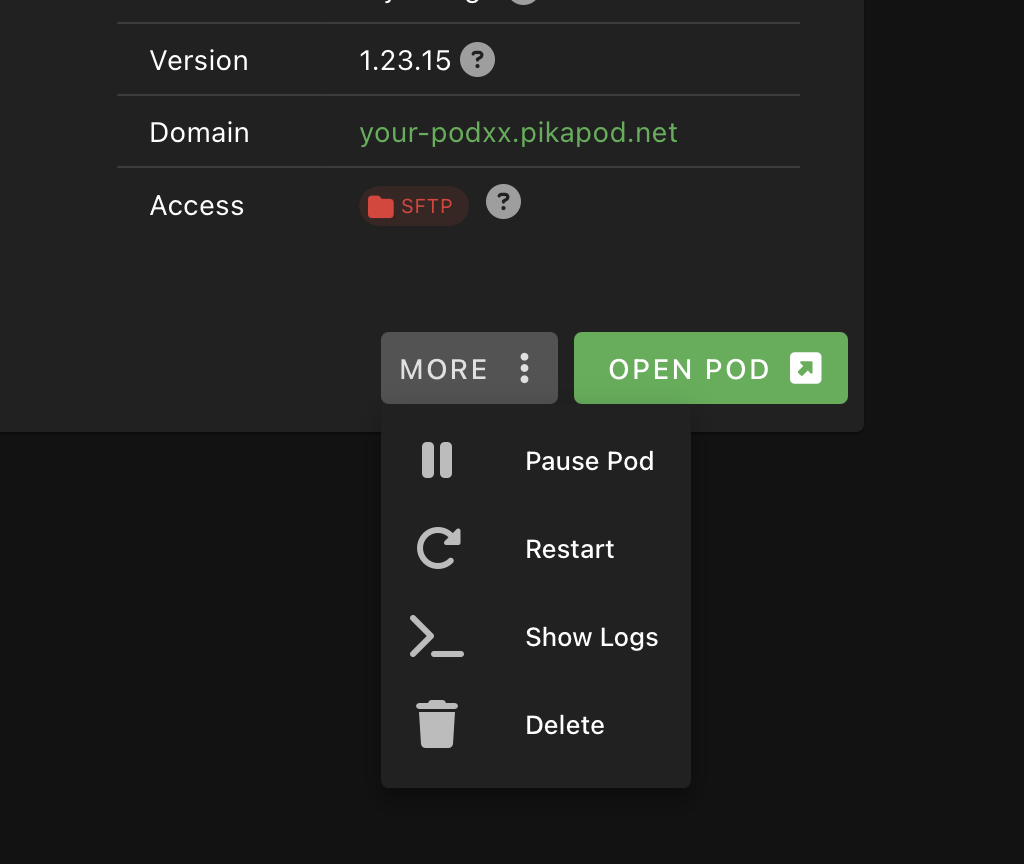
Section titled “Check Logs”In most cases, the detailed error can be found in the pod logs. To view them, follow these steps:
- Navigate to your pod card.
- Click on the More button located at the bottom right of the pod card.
- Select Show Logs from the dialogue menu that appears.
Some apps also write logs to their persistent storage. Those can be accessed via SFTP.
Restart Pod
Section titled “Restart Pod”You can restart the pod from More > Restart Pod. This will resolve many errors and can be needed to apply changed settings.
Still Stuck?
Section titled “Still Stuck?”- Check the App Help page of your app for known issues and fixes.
- If the error is still unclear or no log is available, use Report Issue, include the logs you got, and we’ll investigate further.